
Download HiBit Uninstaller – Powerful PC Cleanup Tool
Overview
HiBit Uninstaller is a dedicated utility designed for Windows users seeking to optimize their system’s performance by removing unwanted or unused applications. The app serves as a comprehensive tool for managing installed software, helping users reclaim valuable disk space and maintain a clutter-free computing environment. Its primary purpose is to simplify the often cumbersome process of uninstalling programs, particularly those that leave behind residual files or registry entries after standard removal.
Target users include both casual PC users and advanced individuals who prioritize system efficiency and organization. Whether managing a personal laptop or maintaining multiple workstations, HiBit Uninstaller offers a streamlined method to audit installed applications and make informed decisions about what to keep or remove. The tool is especially useful for users experiencing slow performance due to accumulated software bloat or those preparing to sell or upgrade their hardware.
Developed by HiBit, the application is positioned as a reliable solution within the utilities category. Although specific company background details were not provided, the app’s focus on functionality, clean interface, and system optimization reflects a clear commitment to user experience. In the broader software ecosystem, HiBit Uninstaller fills a critical gap by offering a more thorough uninstallation process than the default Windows control panel.
Key Features & Functionality
- Easy Program Removal – Users can select one or multiple applications from a complete list and initiate removal with minimal steps. This feature ensures that unwanted programs are eliminated efficiently, reducing the risk of incomplete uninstallation.
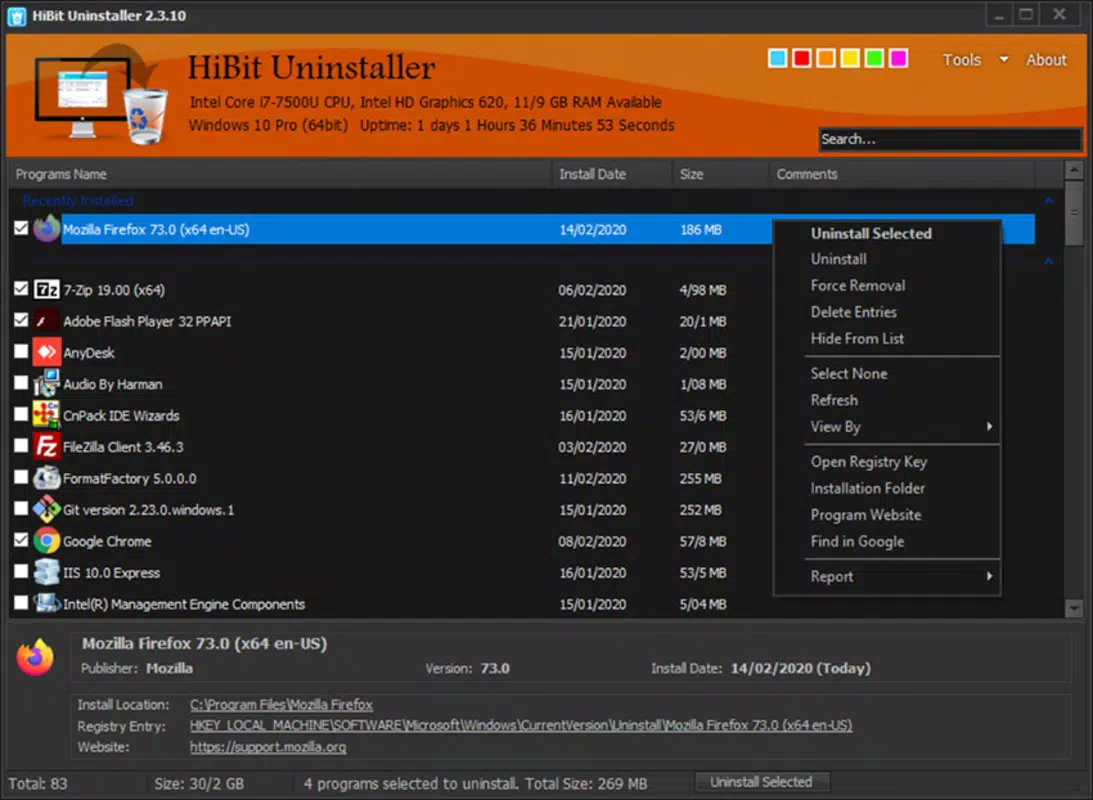
- Informative Interface – The app displays detailed information about each installed program, including file size, installation date, and resource usage. This transparency empowers users to identify space-hogging applications and prioritize removal based on actual impact.
- Comprehensive Program Listing – HiBit Uninstaller scans the entire system to provide a full inventory of installed software, ensuring no application is overlooked during cleanup. This thoroughness is essential for maintaining a complete overview of system contents.
- Efficient PC Management – By enabling quick and complete removal of unnecessary programs, the tool supports long-term system health and performance optimization, particularly for users with limited storage capacity.
- User-Friendly Design – The interface is structured for accessibility, allowing users of all experience levels to navigate and use the tool without requiring technical expertise.
For example, a user preparing to upgrade their hard drive can use HiBit Uninstaller to identify and remove outdated or redundant software before transferring data. Similarly, a business IT administrator might use the tool to standardize software configurations across multiple machines.
Interface, UX & Performance
HiBit Uninstaller features a clean, organized layout that prioritizes clarity and usability. The main window presents a categorized list of installed applications, with columns displaying name, size, installation date, and uninstall status. Navigation is intuitive, with clearly labeled buttons and consistent visual cues that guide users through each step of the removal process.
The visual style is minimalistic and functional, avoiding unnecessary graphics that could distract from core tasks. Menus are logically structured, and context-sensitive actions are accessible with a single click. Users can filter applications by size, date, or name, enhancing the ability to locate specific programs quickly.
Although the developer did not list formal performance metrics, the app operates smoothly on standard Windows systems, with responsive interactions and quick loading times. Stability appears consistent across different device categories, though no specific testing data was provided. The tool does not consume excessive system resources during operation, ensuring it does not interfere with other running processes.
Platform Compatibility & Technical Requirements
HiBit Uninstaller is designed exclusively for the Windows operating system. It supports Windows 7 and later versions, although specific minimum OS requirements were not listed. The application has a file size of 22.9 MB, which is compact for a utility of its scope, indicating efficient packaging and minimal overhead.
The current software version is 2.4.1.0, released on April 27, 2023. This version includes updates focused on usability and system compatibility. No additional hardware requirements were specified, suggesting it runs effectively on standard desktop and laptop configurations.
Pros and Cons
Pros
- Provides a comprehensive list of all installed programs for thorough system auditing.
- Offers detailed insights into program size and installation history.
- Supports batch removal of multiple applications for faster cleanup.
- Intuitive interface suitable for users of all technical levels.
- Efficiently frees up disk space with minimal user effort.
Cons
- Price point of $29.95 may be considered high for casual users.
- Not available for mobile platforms such as Android or iOS.
- Specific system requirements were not disclosed.
- Does not include built-in backup or restore functionality for removed data.
- Limited support for third-party uninstallation tracking.
FAQ
Is HiBit Uninstaller safe to use?
Yes, HiBit Uninstaller is designed to remove only the intended applications and their associated files. It does not modify system-critical components unless explicitly requested by the user.
Can I uninstall multiple programs at once?
Yes, the app allows users to select multiple applications and initiate their removal in a single operation, streamlining the cleanup process.
Does HiBit Uninstaller work on older Windows versions?
While the app is compatible with Windows 7 and later, specific compatibility details for older versions were not provided by the developer.
Is there a free version available?
The provided information does not include details about a free trial or freemium model. The app is listed at a one-time purchase price of $29.95.
How often should I use HiBit Uninstaller?
Users may benefit from periodic use—such as every few months—to maintain system performance and ensure no unnecessary software accumulates.
Final Thoughts
HiBit Uninstaller stands out as a dependable and feature-rich tool for Windows users committed to maintaining a clean, high-performing system. Its ability to provide detailed insights, support batch removal, and deliver a smooth user experience makes it a valuable addition to any PC maintenance routine. While the price may be a consideration for some, the efficiency and depth of functionality justify the investment for users serious about system optimization.
Whether you're a home user managing personal files or a professional overseeing multiple workstations, HiBit Uninstaller delivers consistent value. It simplifies what is often a tedious task and helps users reclaim control over their storage and system health.
Download HiBit Uninstaller now


